Why traders use Telegram bots
Telegram trading bots have shifted from niche tools to essential infrastructure for high-frequency DeFi traders. The primary draw is speed. While traditional web interfaces require multiple clicks to connect wallets, approve tokens, and execute swaps, bots compress this into a single command. In volatile markets, that difference between seconds and minutes can determine whether a trade captures a breakout or gets left behind.
These bots also solve the mobility problem. Trading from a phone browser is often clunky and prone to connection drops. Telegram bots run on the official client, allowing traders to monitor positions and execute trades anywhere without switching apps or dealing with slow mobile web performance. Many popular bots now include advanced features like stop-loss orders, take-profit targets, and copy trading, which were once exclusive to desktop platforms Coinbase.
For sophisticated traders, the value extends beyond convenience. Bots can be configured to interact directly with blockchain mempool data, allowing for faster transaction submission and protection against MEV (Maximal Extractable Value) bots that front-run public transactions. This technical edge is critical when trading high-stakes assets where slippage can erase profits instantly.
The combination of mobile accessibility, execution speed, and advanced order types makes these tools indispensable for anyone serious about active trading. However, this convenience comes with heightened security responsibilities, which we will cover in the next section.
Choose your bot and chain
Your first decision in this Telegram Trading Bots guide is picking the right chain. The ecosystem is fragmented, and a bot that dominates on Solana may struggle on Base or Ethereum. You need a tool that matches the network's speed and fee structure to your trading style.
Start by identifying your primary chain. Solana bots prioritize raw speed and low latency, which is essential for sniping new tokens. Ethereum bots focus on complex MEV protection and gas optimization. Base bots are gaining traction for their low costs and compatibility with Solana-style interfaces.
Next, match the bot's features to your strategy. If you are copy trading, look for bots with reliable signal integration. If you are sniping, you need anti-rug and limit order capabilities. The table below compares the top performers by chain support and key features.
| Bot | Primary Chain | Fee Model | Key Features |
|---|---|---|---|
| Trojan | Solana | 0.6% | Anti-rug, limit orders |
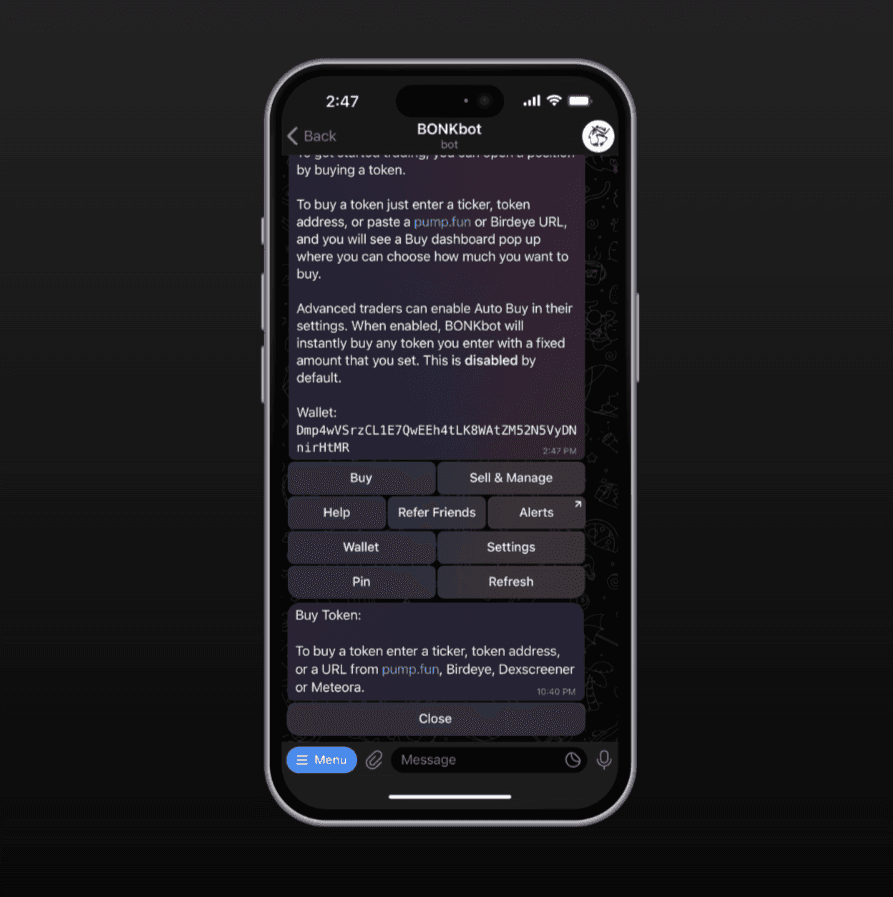
| BONKbot | Solana | 0.5% | Fast execution, simple UI |
| Maestro | Multi-chain | ~0.5% | Copy trading, DCA |
| Banana Gun | Multi-chain | ~0.5% | MEV protection, sniping |
Most top-tier bots charge a transaction fee ranging from 0.5% to 0.6%. This is standard for the industry, as it covers the computational cost of priority fees and MEV protection. Always check the fee structure before depositing funds. A lower fee might mean slower execution, which can cost you more in missed opportunities.
Set up your bot securely
Connecting a wallet to a Telegram trading bot requires more than just clicking a button. You are effectively handing over the keys to your digital assets to a piece of software that lives in a chat app. This section walks you through the exact steps to configure your Telegram Trading Bots guide setup safely, ensuring you retain control while minimizing exposure to common attack vectors.
Create a dedicated burner wallet
Never connect your primary holding wallet to a trading bot. Instead, generate a fresh, empty wallet specifically for bot interactions. This "burner" wallet isolates your main assets; if the bot is compromised, your long-term portfolio remains untouched. Use a reputable wallet provider like Privy to create this dedicated identity, which allows you to revoke access instantly without touching your main funds [src-serp-1].
Finalize security checks
Before executing live trades, verify that your bot’s interface matches the official documentation. Scammers often create look-alike bots that mimic popular trading tools to steal credentials. Double-check the bot’s username and developer verification status. Once connected, monitor the first few transactions closely to ensure they execute at the prices you expect.
By following this structured setup, you transform a potentially risky integration into a controlled, secure workflow. The goal is to maintain strict boundaries between your trading activity and your core assets.
Configure execution parameters
Fine-tuning your Telegram Trading Bots guide settings is where theory meets reality. The difference between a profitable trade and a failed one often comes down to how you handle slippage, gas fees, and auto-execution limits. These parameters act as your safety net and speed dial, allowing you to balance the desire for quick entry against the risk of paying too much for it.
Set your slippage tolerance
Slippage is the difference between the price you expect and the price you actually get. In volatile markets, setting a tight slippage tolerance might cause your trade to fail entirely, while a loose tolerance could mean buying at a significant premium. For most ERC-20 tokens on networks like Solana or Base, a slippage between 1% and 2% is standard. If you are trading highly illiquid tokens, you may need to increase this to 5-10% to ensure the transaction goes through, but be aware of the increased cost. Always adjust this dynamically based on the token's volatility rather than leaving it on a static default.
Manage gas fees for speed vs. cost
Gas fees determine how quickly your transaction is processed by the network. Most Telegram trading bots allow you to choose between standard, priority, and ultra-priority gas settings. Standard gas is cheaper but slower, which can be risky in fast-moving markets. Priority gas ensures your transaction is included in the next block, while ultra-priority uses a higher fee to jump ahead of other pending transactions. For high-stakes trades, using priority gas is often worth the small extra cost to avoid front-running or failed attempts. On networks like Base, gas fees are generally low, making priority transactions a cost-effective way to ensure speed.
Configure auto-buy and sell limits
Auto-buy and sell limits help you execute trades without manual intervention, which is critical when prices move in seconds. Set your auto-buy limit to trigger a purchase when a token's liquidity reaches a certain threshold or when it hits a specific price point. Similarly, auto-sell limits can be set to take profits or cut losses automatically. For example, you might set a sell limit at 20% profit and a stop-loss at 10% loss. This removes emotional decision-making from the equation and ensures you stick to your trading strategy. However, be cautious with overly aggressive limits, as they can trigger trades during temporary price dips or spikes that are not indicative of the token's true value.
Test with small amounts first
Before committing significant capital, test your configured parameters with small amounts. This allows you to see how the bot handles different market conditions and whether your slippage and gas settings are optimal. Most reputable Telegram trading bots offer a testnet or demo mode for this purpose. Use this opportunity to refine your settings and ensure that the bot executes trades as expected. Once you are confident in your configuration, you can scale up your trading activity with greater assurance.
Test trades before scaling up
Before you commit significant capital, treat your Telegram Trading Bots guide setup like a dry run. Even the most reliable software can glitch, and smart contract interactions carry inherent risks. A small test trade verifies that your bot connects correctly, executes orders as expected, and that your security permissions are configured properly.
Start with an amount you are completely comfortable losing. This minimum viable test confirms that slippage tolerance, gas limits, and wallet approvals are functioning without exposing your main portfolio to potential exploits. Community advice from experienced users consistently emphasizes starting small to catch configuration errors early.
Once the test trade succeeds, review the transaction history on the blockchain explorer. Verify the execution price and confirm that the bot did not overpay or fail to execute due to network congestion. Only after confirming these mechanics should you consider increasing your trade size.
Common mistakes and fixes
The easiest mistake with Telegram Trading Bots is changing too much at once. Rename devices, move networks, update firmware, or adjust permissions one at a time. When setup fails, the last change should be obvious enough to undo without rebuilding the whole configuration. Do not treat a successful app screen as the final test. Use the physical control, the app, and any connected automation to confirm the setup works from every path the reader will actually use.
The simplest way to use this section is to keep the setup small, verify each change, and record the stable configuration before adding optional accessories.
No comments yet. Be the first to share your thoughts!